Your WordPress site can look good and still get no traffic from Google. That feels frustrating, especially when you have already published pages, installed an SEO plugin, and waited for results.
The problem is usually not one single thing. Your site may not be indexed. Sometimes keywords are simply too hard to rank for. Content may not fully match search intent. Internal links could be too weak or missing. In some cases, the site is still too new for Google to fully understand it.
This guide will help you diagnose the real issue step by step. You do not need advanced technical SEO knowledge. You just need to check the right things in the right order.
First, Understand the Difference Between Indexed and Ranking
Before fixing rankings, you need to know whether Google has indexed your site. Many beginners say, “My website is not ranking,” when the real issue is that Google has not added the page to its index yet.
Indexed means Google knows the page exists and can show it in search results. Ranking means the page appears for a specific keyword or search query.
| Term | What It Means | Example |
|---|---|---|
| Crawled | Google visited the page | Googlebot found your blog post |
| Indexed | Google stored the page | Your page can appear in results |
| Ranking | Your page appears for a query | Your post appears for “WordPress SEO tips” |
| Not ranking | Indexed but too low | Your page appears on page 8 |
| Not indexed | Not eligible to rank | Google does not show the page |
To check this, search Google using this format:
site:yourdomain.com
If your pages appear, Google has indexed at least part of your site. If nothing appears, your site may have an indexing, crawling, or blocking issue.
For a better check, use Google Search Console. Open the URL Inspection tool, paste your page URL, and see whether Google says the page is indexed.
Reason 1: Your WordPress Site Is Too New
A new WordPress site usually does not rank immediately. Google needs time to discover your pages, crawl them, index them, understand your content, and test where your pages belong.
This does not mean your site is bad. It means your site has not built enough history, topical coverage, internal links, or trust signals yet.
A new website often needs consistent publishing and cleanup before rankings become visible. If your site is only a few days or weeks old, do not panic too early.
| Website Age | What Usually Happens |
| 1–2 weeks | Google may discover some pages |
| 2–6 weeks | Some pages may get indexed |
| 1–3 months | Long-tail impressions may appear |
| 3–6 months | Stronger pages may start ranking |
| 6+ months | Patterns become easier to measure |
This timeline is not guaranteed. A strong niche site can move faster, while a weak or messy site can take much longer.
Reason 2: WordPress May Be Blocking Search Engines
WordPress has a setting that can discourage search engines from indexing your site. This is useful during development, but it becomes a serious problem if left on after launch.
Go to your WordPress dashboard. Then open:
Settings > Reading
Look for this option:
Discourage search engines from indexing this site
If that box is checked, uncheck it and save changes.
Also check your SEO plugin. Some pages may be set to “noindex” by mistake. This tells search engines not to index the page.
Common blocking issues include:
| Problem | Where to Check |
| Search engines discouraged | WordPress Reading settings |
| Page set to noindex | SEO plugin page settings |
| Robots.txt blocking Google | Robots.txt file |
| Password protection | Hosting or WordPress settings |
| Maintenance mode active | Maintenance plugin |
| Staging settings copied live | SEO plugin and hosting setup |
This is one of the first things beginners should check. A simple setting can stop your entire site from appearing on Google.
Reason 3: Your Pages Are Not Indexed Yet
Sometimes your site is not blocked, but your pages still are not indexed. This can happen for many reasons.
Open Google Search Console and check the Pages report. You may see statuses like “Discovered currently not indexed,” “Crawled currently not indexed,” “Duplicate,” “Soft 404,” or “Server error.”
These messages sound scary, but many are fixable.
| Search Console Status | What It Usually Means | Beginner Fix |
| Discovered currently not indexed | Google found URL but has not crawled it yet | Improve internal links and sitemap |
| Crawled currently not indexed | Google crawled it but did not index it | Improve content quality and uniqueness |
| Duplicate without user-selected canonical | Google found similar pages | Add canonical or merge content |
| Soft 404 | Page looks empty or weak | Add useful content or remove page |
| Server error | Google could not access page | Check hosting and uptime |
| Redirect error | URL redirect is broken | Fix redirect chain |
If an important page is not indexed, do not only request indexing again and again. First improve the page. Add useful content, internal links, clear headings, original examples, and a proper title.
Then inspect the URL in Search Console and request indexing after the page is ready.
Reason 4: Your Sitemap Is Missing or Not Submitted
A sitemap helps search engines discover important URLs on your website. Most WordPress SEO plugins can create a sitemap automatically.
Your sitemap usually looks something like this:
https://yourdomain.com/sitemap_index.xml
Open your SEO plugin and check whether XML sitemaps are enabled. Then submit the sitemap in Google Search Console under the Sitemaps section.
A sitemap does not guarantee ranking. It simply helps Google find your important pages more clearly.
After submitting your sitemap, check for errors. If Search Console cannot fetch it, your plugin, cache, security settings, or server may be blocking access.
Reason 5: Your Keywords Are Too Competitive
Many WordPress sites do not rank because they target keywords they cannot realistically win yet.
For example, a new blog targeting “best web hosting,” “weight loss,” “credit cards,” or “insurance quotes” will face huge competition. These search results are usually filled with big brands and high-authority websites.
A beginner site should start with narrow, specific keywords.
| Too Competitive | Better Beginner Keyword |
| WordPress SEO | WordPress SEO checklist for new bloggers |
| Best laptops | Best laptop for college students under 500 |
| Weight loss tips | Healthy lunch ideas for office workers |
| Web hosting | Best hosting for small WordPress blogs |
| Google ranking | Why WordPress site is not ranking on Google |
Before writing, search your target keyword manually. Look at the first page. If every result is from a huge brand, choose a more specific topic.
Ranking is easier when your article answers a focused question better than the current results.
Reason 6: Your Content Does Not Match Search Intent
Search intent means the real reason behind a search. If your page does not match the searcher’s intent, Google has little reason to rank it higher.
For example, someone searching “why WordPress site is not ranking” wants a fix guide. They do not want a sales page for an SEO service. They also do not want a vague article explaining that SEO is important.
Your content should match the format Google already rewards.
| Search Query | Likely Intent | Best Content Type |
| why my WordPress site is not ranking | Diagnose and fix | Step-by-step guide |
| WordPress SEO checklist | Complete setup | Checklist |
| best SEO plugin for WordPress | Compare options | Comparison guide |
| how to submit sitemap | Learn task | Tutorial |
| what is noindex | Understand term | Simple explanation |
Search the keyword before writing. If most results are tutorials, write a tutorial. Similarly, if most results are checklists, write a checklist. In case most results are comparisons, write a comparison.
You do not need to copy competitors. You need to understand what the searcher expects and then make your version more useful.
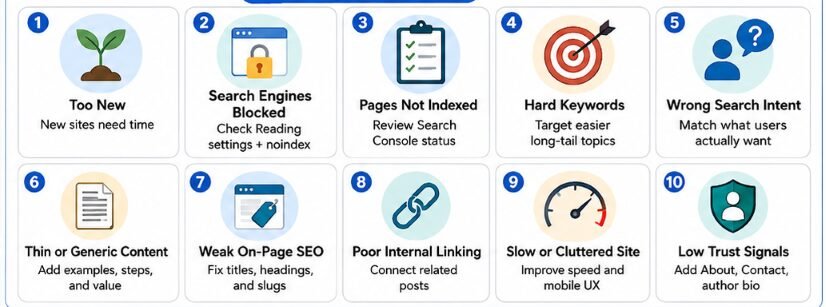
Reason 7: Your Content Is Too Thin or Generic
Thin content does not mean short content. A short article can rank if it fully answers the question. Thin content means the page does not provide enough useful value.
Generic content is another problem. If your article says the same things as every other article, Google has no strong reason to rank your version.
Weak content sounds like this:
“SEO is important for every website. You should write quality content, use keywords, and improve your site speed.”
Helpful content sounds like this:
“Open Search Console, go to Pages, find URLs marked ‘Crawled currently not indexed,’ then improve those pages with clearer headings, stronger examples, internal links, and unique information before requesting indexing again.”
The second version gives the reader a real action.
To improve thin content, add:
- Practical examples
- Screenshots
- Step-by-step fixes
- Tables
- FAQs
- Common mistakes
- Original observations
- Before-and-after examples
- Clear next steps
Your article should make the reader feel, “Now I know what to do.”
Reason 8: Your WordPress On-Page SEO Is Weak
On-page SEO helps Google understand your page. It also helps users decide whether to click.
Start with your SEO title. It should clearly explain what the page is about and why it is useful.
Weak title:
WordPress Ranking
Better title:
Why Your WordPress Site Is Not Ranking on Google: 15 Fixes for Beginners
Your meta description should summarize the page in a helpful way. It does not directly guarantee ranking, but it can influence clicks when Google uses it as the search snippet.
Check these WordPress on-page elements before publishing:
| Element | What to Do |
| SEO title | Include the main topic and clear benefit |
| Meta description | Explain what the reader will learn |
| H1 | Use one clear main heading |
| H2 headings | Break the guide into useful sections |
| Slug | Keep it short and readable |
| Image alt text | Describe images naturally |
| Category | Use one relevant category |
| Tags | Avoid too many random tags |
| Internal links | Link to related posts |
| Author bio | Show real topic experience |
| Updated date | Keep it accurate |
Do not stuff keywords into every sentence. Write naturally and use your main keyword where it fits.
Reason 9: Your Site Structure Is Confusing
A confusing WordPress structure makes it harder for users and search engines to understand your website.
Beginners often create too many categories and tags. They publish posts in random topics. They also forget to connect related articles together.
A cleaner structure looks like this:
Home > SEO > WordPress SEO > WordPress Ranking Fix Guide
A messy structure looks like this:
Home > Blog > Tips > SEO Stuff > Random Posts > Page 6
Your website should have clear categories. Each category should contain closely related content.
For example, an SEO blog could use categories like:
- WordPress SEO
- Keyword Research
- Technical SEO
- Content Optimization
- Google Search Console
Avoid creating a new category for every article. Categories should organize your site, not create clutter.
Reason 10: You Have Weak Internal Linking
Internal links are links from one page on your site to another page on your site. They help Google discover pages and understand relationships between topics.
Many WordPress sites have orphan posts. These are posts with no internal links pointing to them.
If no page links to your article, it becomes harder for users and search engines to find it.
Use this simple internal linking rule for each new post:
- Link to one main guide.
- Link to two related posts.
- Edit two older posts and link back to the new post.
Example:
| New Post | Internal Links to Add |
| Why Your WordPress Site Is Not Ranking | Link to WordPress SEO Checklist |
| Link to Google Search Console Guide | |
| Link to Site Speed Guide | |
| Add link from old post about indexing | |
| Add link from old post about on-page SEO |
Use descriptive anchor text. Instead of “click here,” write “WordPress SEO checklist” or “Google Search Console guide.”
Good internal links help readers continue learning. They also help Google understand which pages matter most.
Reason 11: Your Website Is Slow or Hard to Use
A slow WordPress site can hurt user experience. Visitors may leave before reading your content, especially on mobile.
Common speed problems include large images, heavy themes, too many plugins, sliders, autoplay videos, poor hosting, and unoptimized fonts.
Start with simple fixes:
- Compress images before uploading.
- Use a lightweight theme.
- Remove plugins you do not use.
- Use caching.
- Avoid large sliders.
- Use lazy loading.
- Keep your design clean.
- Test your site on mobile.
- Avoid intrusive popups.
You do not need a perfect speed score. You need a page that loads smoothly and lets readers access the main content without frustration.
If you use AdSense, be careful with ad placement. Too many ads above the fold can make your page feel crowded and low quality.
A helpful page should feel like content with ads, not ads with some content.
Reason 12: Google Does Not Trust Your Website Yet
Trust matters, especially for topics that affect money, health, safety, legal decisions, or major life choices.
Even for normal blog topics, readers want to know who is behind the content. A faceless website with no About page, no author bio, no contact details, and no editorial standards can feel weak.
Add basic trust signals:
- About page
- Contact page
- Privacy Policy
- Author bio
- Editorial note
- Last updated date
- Clear sources
- Real examples
- Original images or screenshots
- Transparent affiliate disclosure, if needed
For a beginner WordPress site, this is not complicated. You just need to show that real people are responsible for the content.
A simple author bio can help:
“Written by [Name], a WordPress SEO writer focused on helping beginners fix indexing, content, and on-page SEO problems.”
Do not pretend to be an expert you are not. Be clear, useful, and honest.
Reason 13: Your Site Has Duplicate or Cannibalized Content
Duplicate content happens when several pages have the same or very similar content. Keyword cannibalization happens when multiple pages target the same search intent.
For example, these three posts may compete with each other:
- How to Rank WordPress Site on Google
- How to Improve WordPress Ranking
- Why WordPress Site Is Not Ranking
If all three articles say almost the same thing, Google may struggle to choose the best page.
Fix this by choosing one main page and improving it. Then merge weak duplicate posts or redirect them to the stronger page.
You can also use canonical tags when similar pages need to exist, but one version should be treated as the main version.
Do not publish five articles for the same keyword just to create more content. One strong page is better than five weak pages.
Reason 14: Your SEO Plugin Is Installed but Not Set Up Properly
Installing an SEO plugin does not automatically make your site rank. The plugin only gives you tools.
You still need to set up titles, meta descriptions, sitemaps, schema, breadcrumbs, and indexing settings correctly.
Check these settings inside your SEO plugin:
| Setting | What to Check |
| XML sitemap | Make sure it is enabled |
| Search appearance | Check title and description templates |
| Noindex settings | Make sure important pages are indexable |
| Schema | Use correct basic schema |
| Breadcrumbs | Enable if your theme supports them |
| Social preview | Set image and title for sharing |
| Category archives | Decide whether they should index |
| Tag archives | Noindex thin tag pages if needed |
Do not chase green scores only. A green score does not mean the article is useful. Always put the reader first.
Reason 15: Your Titles Are Not Getting Clicks
Sometimes your page ranks, but nobody clicks it. This usually means your title is weak, unclear, boring, or mismatched with search intent.
Open Google Search Console and check pages with high impressions but low click-through rate.
Then improve the title.
| Weak Title | Better Title |
| WordPress SEO Problems | Why Your WordPress Site Is Not Ranking on Google |
| SEO Tips for Website | 15 WordPress SEO Fixes for Beginners |
| Google Ranking Guide | How to Fix a WordPress Site Not Showing on Google |
| WordPress Blog Help | Why Your Blog Posts Are Not Ranking and How to Fix Them |
A good title should be clear before it is clever. Avoid clickbait because it may disappoint readers and damage trust.
Reason 16: You Are Not Updating Old Content
Old content can lose rankings when information becomes outdated, competitors improve their pages, or search intent changes.
Updating old posts is one of the easiest ways to improve a WordPress site that is not ranking.
Update old posts by adding:
- Fresh examples
- New screenshots
- Better headings
- More complete answers
- Internal links
- FAQs
- Updated plugin steps
- Better titles
- Clearer meta descriptions
- Removed outdated claims
Do not change the date just to look fresh. Update the content meaningfully, then show the accurate updated date.
Reason 17: Your Website Has Technical Errors
Technical errors can stop Google from accessing, understanding, or ranking your pages properly.
Beginners do not need to become developers, but they should check basic technical issues.
Common issues include:
| Technical Issue | Why It Hurts |
| Broken pages | Users and Google reach errors |
| Redirect chains | Pages become harder to crawl |
| Mixed HTTP and HTTPS | Security and consistency issues |
| Bad canonical tags | Wrong page may be selected |
| Blocked resources | Google may not render page properly |
| Server downtime | Google cannot access the site |
| Broken mobile layout | Readers leave quickly |
Use Search Console, your SEO plugin, and a basic site audit tool to find these problems.
Fix the biggest issues first. Do not waste hours on tiny warnings while important pages remain blocked or empty.
Reason 18: Your Content Has No Clear Topical Focus
Google needs to understand what your website is about. If your site publishes recipes, crypto news, fashion tips, WordPress tutorials, pet advice, and product reviews together, it may look unfocused.
A focused site is easier to understand. It also builds topical depth faster.
For example, if your website is about WordPress SEO, publish clusters around:
- WordPress indexing
- On-page SEO
- Internal linking
- Site speed
- Google Search Console
- Content optimization
This gives your site a clear identity.
A small focused site can often grow better than a large random blog with no direction.
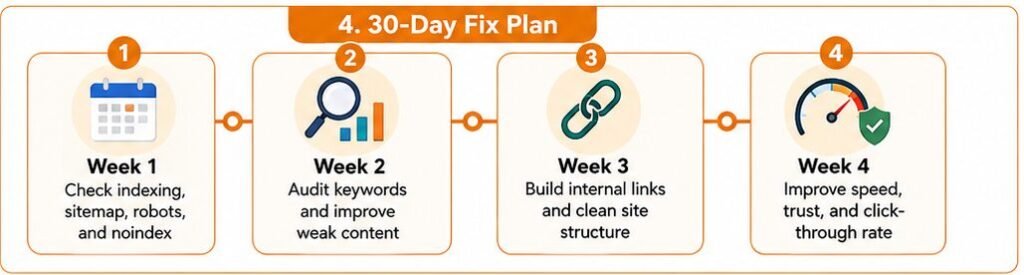
30-Day Fix Plan for a WordPress Site Not Ranking
Use this simple 30-day plan to diagnose and improve your site.
| Week | Focus | Actions |
| Week 1 | Indexing and crawling | Check Search Console, sitemap, noindex, robots.txt, and URL Inspection |
| Week 2 | Keywords and content | Find hard keywords, improve weak posts, match search intent |
| Week 3 | Internal links and structure | Fix orphan posts, clean categories, add breadcrumbs |
| Week 4 | Speed, trust, and CTR | Improve mobile layout, add trust pages, rewrite weak titles |
During week one, fix anything that blocks Google. Do not worry about advanced SEO until your important pages are indexable.
During week two, review your content honestly. If the article does not fully answer the topic, improve it before publishing more.
During week three, connect related posts together. A strong internal linking system can improve discovery and topical clarity.
During week four, improve user experience. Clean design, readable pages, better titles, and trust signals can all support better performance.
Quick Diagnostic Checklist
Use this checklist before assuming Google is ignoring your site.
| Question | Yes or No |
| Is your site indexed in Google? | |
| Is the page indexed in Search Console? | |
| Is WordPress blocking search engines? | |
| Is the page set to noindex? | |
| Is your sitemap submitted? | |
| Is your keyword realistic? | |
| Does your content match search intent? | |
| Is your content better than page-one results? | |
| Does the page have internal links? | |
| Is the page fast and mobile-friendly? | |
| Do you have About and Contact pages? | |
| Are your titles clear and clickable? |
If you answer “no” to several items, you have your fix list.
FAQs
Your WordPress site may not rank because it is not indexed, blocked by settings, targeting hard keywords, publishing thin content, missing internal links, loading slowly, or lacking trust signals.
Search Google using site:yourdomain.com. Then use Google Search Console URL Inspection for a more accurate page-level check.
If a page is indexed but not ranking, the keyword may be too competitive, the content may not match search intent, or the page may need better internal links and stronger on-page SEO.
A new WordPress site can take weeks or months to show meaningful ranking movement. The timeline depends on competition, content quality, indexing, internal links, and site trust.
Yes, a new WordPress site can rank without backlinks for low-competition and long-tail keywords. Competitive keywords usually need stronger authority and trust.
No. SEO plugins help manage titles, sitemaps, schema, and indexing settings. They do not replace helpful content, strong structure, internal links, or good user experience.
Your blog posts may not be indexed, may be set to noindex, may have weak content, or may not have enough internal links. Check each URL in Google Search Console.
Update old posts first if they already have impressions or rankings. Publishing new posts also helps, but weak old content can hold back your site.
Changing a theme can affect rankings if it changes speed, layout, headings, schema, internal links, or mobile usability. Test carefully before and after changing themes.
There is no fixed number. A few strong, focused, helpful pages can perform better than many weak pages. Quality, structure, and search intent matter more than page count.
Final Thoughts
Your WordPress site is usually not ranking for a fixable reason. Start by checking whether Google can find and index your pages. Then review your keywords, content quality, internal links, speed, and trust signals.
Do not jump straight into advanced SEO. Most beginner ranking problems come from basic issues: blocked indexing, weak content, hard keywords, poor structure, and missing internal links.
Fix those first. Then use Google Search Console to track what is working. SEO becomes much easier when you stop guessing and start diagnosing the real problem.