Backlinks can help a website rank, but they are not the only path to Google traffic. Many beginners get stuck because they think SEO is impossible without outreach, guest posts, or paid link-building campaigns.
The truth is more practical. You can improve Google rankings without backlinks by choosing easier keywords, writing better content, fixing WordPress SEO basics, building strong internal links, and improving the user experience on each page.
This method works best for beginner blogs, niche websites, small business websites, local service pages, and informational WordPress posts. It will not magically rank a brand-new website for extremely competitive keywords, but it can help you build steady organic traffic without chasing backlinks all day.
Can You Really Rank Without Backlinks?
Yes, you can rank without backlinks, especially for low-competition and long-tail keywords. Backlinks still matter in competitive search results, but Google also looks at content quality, relevance, structure, page experience, and how well your page answers the searcher’s question.
Think of backlinks as one signal, not the whole game. A small WordPress site can still win when the topic is narrow, the content is genuinely helpful, and competing pages are weak, outdated, thin, or poorly organized.
| Keyword Type | Can You Rank Without Backlinks? | Example |
|---|---|---|
| Broad competitive keyword | Difficult | best laptops |
| Long-tail informational keyword | Possible | how to clean laptop fan without opening it |
| Local service keyword | Possible | emergency plumber in small town |
| Beginner tutorial keyword | Possible | how to add table of contents in WordPress |
| Product review keyword | Harder but possible | best budget tripod for iPhone beginners |
The goal is not to beat massive authority websites on day one. The goal is to find search queries where your page can be more useful, more specific, and easier to read than what is already ranking.
Read also: A Step-by-Step Guide to WordPress Installation on cPanel!
What Helps a WordPress Page Rank Without Backlinks?
A WordPress page can rank without backlinks when it gives Google and readers clear signals. Your topic should be focused, your page should load quickly, your headings should make sense, and your internal links should connect related pages together.
Most beginners only write and publish. A better method is to plan, optimize, connect, measure, and update. That is where WordPress gives you an advantage because you can control many ranking elements without touching backlinks.
| Ranking Lever | Why It Helps | WordPress Action |
|---|---|---|
| Search intent | Matches what users want | Study page-one results before writing |
| On-page SEO | Helps Google understand the page | Optimize title, slug, H1, headings |
| Internal links | Helps discovery and context | Link related posts together |
| Helpful content | Keeps readers satisfied | Add examples, steps, tables, FAQs |
| Page speed | Improves user experience | Compress images and use caching |
| Mobile layout | Helps mobile visitors read easily | Test every page on phone |
| Freshness | Keeps content useful | Update old posts regularly |
| Schema | Clarifies page meaning | Use safe schema through SEO plugin |
This is the foundation of no-backlink SEO. You are improving everything you can control inside your WordPress site.
You may also link: How Hackers Attack WordPress Sites: Explained Simply
Step 1: Choose Keywords You Can Win Without Backlinks
Keyword selection is the biggest difference between frustration and progress. If your WordPress site is new, do not start with huge keywords like “best credit cards,” “weight loss tips,” or “best web hosting.”
Those topics are usually dominated by trusted brands, large media websites, and old domains with strong authority. A beginner site should start with narrow keywords that solve a specific problem for a specific reader.
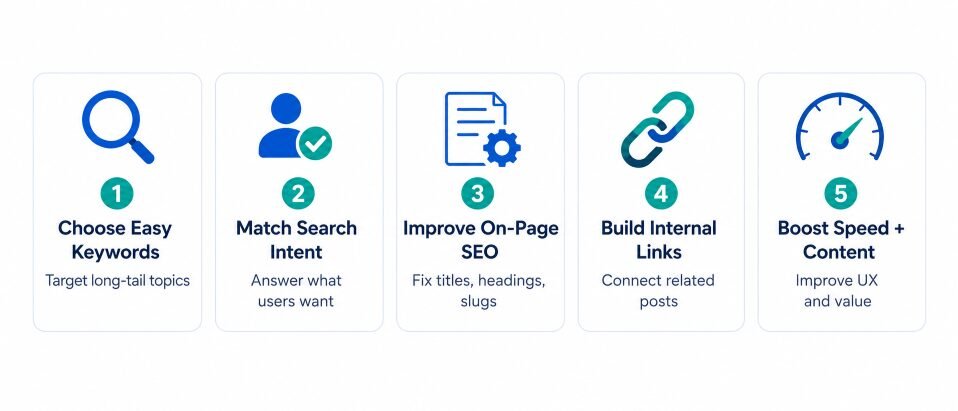
For example, instead of targeting “WordPress SEO,” target “WordPress SEO checklist for new blogs.” Instead of “home gym,” target “small home gym setup for apartment beginners.” These keywords have clearer intent and less competition.
Use Long-Tail Keywords With Clear Intent
Long-tail keywords are longer, more specific search phrases. They usually get fewer searches, but they are often easier to rank for because the user’s need is clear.
A beginner should look for keywords that include words like “how to,” “for beginners,” “checklist,” “template,” “mistakes,” “step by step,” “without,” “under,” “best for,” and “example.”
Here are some examples:
| Broad Keyword | Better No-Backlink Keyword |
|---|---|
| WordPress SEO | WordPress SEO checklist for beginners |
| Google ranking | how to improve Google ranking without backlinks |
| site speed | how to speed up WordPress site without coding |
| internal links | internal linking strategy for new blogs |
| blogging tips | blogging mistakes beginners should avoid |
Specific keywords are easier to satisfy. When the searcher asks a narrow question, your article can answer it directly without needing a giant domain behind it.
Check the First Page Before You Write
Before writing, search your target keyword and study the first page. You are looking for signs that a smaller website can compete.
A keyword may be easier if the results include small blogs, forums, outdated posts, weak titles, thin answers, missing examples, or pages that only partly answer the question.
A keyword may be too hard if the first page is full of major brands, government websites, big magazines, established SaaS companies, or pages with thousands of referring links.
Use this simple test:
| SERP Signal | Meaning |
|---|---|
| Small blogs are ranking | Good opportunity |
| Old posts are ranking | Good update opportunity |
| Forums are ranking | Users want practical answers |
| Big brands dominate | Hard keyword |
| Results do not match intent | Content gap |
| Articles lack examples | Add examples and tables |
This step saves you months of wasted work. Ranking without backlinks is much easier when you choose battles you can actually win.
Step 2: Build a Topic Cluster Before Publishing Random Posts
Many beginners publish random articles and hope Google understands their website. That rarely works well. A stronger method is to build topic clusters.
A topic cluster is a group of related articles around one main topic. You create one main guide, then support it with smaller articles that answer related questions.
For example, if your main topic is WordPress SEO, your cluster could look like this:
| Page Type | Example Article |
|---|---|
| Pillar guide | WordPress SEO Checklist for Beginners |
| Supporting post | How to Write SEO Titles in WordPress |
| Supporting post | How to Add Internal Links in WordPress |
| Supporting post | How to Optimize Images for SEO |
| Supporting post | How to Use Google Search Console |
| Supporting post | How to Improve Site Speed |
| Supporting post | How to Fix Indexing Issues |
Each supporting article should link back to the pillar guide. The pillar guide should also link to the supporting posts where relevant.
This creates a clear content map. Readers can move through your website naturally, and search engines can understand how your pages relate to one another.
Step 3: Match Search Intent Better Than Existing Pages
Search intent means the reason behind a search. A person searching “how to improve Google ranking without backlinks” does not want a sales pitch. They want practical steps they can use without buying links.
Before writing, ask yourself: does the searcher want a tutorial, checklist, comparison, definition, review, template, or troubleshooting guide?
If the top-ranking pages are long guides, you probably need a complete guide. If they are quick lists, a short practical checklist may work better. The goal is not always to write more words. The goal is to answer better.
Use this search intent test before publishing:
| Question | Good Sign |
|---|---|
| Did I answer the main question early? | Yes |
| Did I explain who this method is for? | Yes |
| Did I include practical steps? | Yes |
| Did I include examples? | Yes |
| Did I avoid unrelated sections? | Yes |
| Did I make the next action clear? | Yes |
A page that matches intent feels easy to read. A page that misses intent feels frustrating, even if it is long.
Step 4: Make Your Article More Helpful Than Competing Pages
Helpful content is not just “long content.” A 1,200-word article with real examples can beat a 3,000-word article filled with empty advice.
To make your article more helpful, add things readers can actually use. Include examples, screenshots, templates, mistakes, comparisons, checklists, and simple explanations.
For example, do not only say, “Use internal links.” Show where to place them, what anchor text to use, and how many links a beginner should add.
Weak advice sounds like this:
“Internal linking is important for SEO. You should add internal links to improve rankings.”
Helpful advice sounds like this:
“When you publish a new post, add one link to your main guide, two links to related posts, and then edit two older posts to link back to the new page.”
That second version gives the reader a clear action. This is the kind of content that feels useful instead of generic.
Add First-Hand Style Sections
You can make content more original by adding sections that show judgment and experience. Even if you are writing for beginners, your page should not feel copied from every other blog.
Add sections like:
- What I would do first on a new WordPress site
- My simple rule for choosing easy keywords
- Common beginner mistake
- Quick fix
- When this method will not work
- Example from a small blog
- Before and after optimization example
These sections make the article feel more human. They also give readers information they cannot get from a basic rewritten article.
Step 5: Optimize WordPress On-Page SEO Basics
WordPress makes SEO easier, but it does not optimize everything for you. You still need to check the basics before publishing.
Start with your SEO title. It should include the main keyword and a clear benefit. Avoid boring titles like “SEO Tips.” A better title is “How to Improve Google Ranking Without Backlinks: WordPress Method.”
Your slug should be short and readable. Use words people understand. Avoid long URLs with dates, numbers, or random text.
A good slug:
/improve-google-ranking-without-backlinks/
A weak slug:
/2026/06/post-123-google-seo-ranking-method-final/
Use only one H1 on the page. Then divide the article with helpful H2 and H3 headings. Each heading should tell the reader exactly what that section will explain.
| WordPress Element | Best Practice |
|---|---|
| SEO title | Include main keyword and benefit |
| Meta description | Explain what the reader will learn |
| H1 | Keep it clear and close to the title |
| Slug | Short, readable, keyword-focused |
| H2 headings | Use helpful section names |
| Images | Compress before uploading |
| Alt text | Describe the image naturally |
| Category | Choose one relevant category |
| Tags | Use only when useful |
| Author bio | Show real experience or topic focus |
| Updated date | Keep it accurate |
Do not stuff the keyword everywhere. Use it naturally in the title, intro, one or two headings, and a few places where it fits.
Step 6: Use Internal Links Like a Mini Backlink System
Internal links are links from one page on your website to another page on your website. They are not backlinks, but they are powerful because they help visitors and search engines discover related content.
A new post with no internal links is like a shop with no entrance. It may exist, but nobody can easily find it.
Use this simple 3-link rule for every new WordPress post:
- Link to one main guide or parent topic.
- Link to two related supporting articles.
- Edit two older posts and link back to the new post.
Here is an example:
| New Article | Internal Links to Add |
|---|---|
| How to Improve Google Ranking Without Backlinks | Link to WordPress SEO Checklist |
| Link to Internal Linking Strategy | |
| Link to Google Search Console Guide | |
| Add link from old post about on-page SEO | |
| Add link from old post about low competition keywords |
Use descriptive anchor text. Instead of “click here,” use “WordPress SEO checklist” or “internal linking strategy for beginners.”
Good anchor text tells the reader what to expect. It also helps search engines understand the connected page.
Step 7: Fix Orphan Posts
An orphan post is a page with no internal links pointing to it. This is a common problem on WordPress blogs.
You may publish a useful article, but if no other page links to it, visitors may never find it. Search engines may also treat it as less connected to your website.
To fix this, open your old posts and add links to related newer posts. You can also add links from category pages, resource pages, sidebar sections, or “start here” pages.
Do this once a month. It is one of the easiest no-backlink SEO tasks for beginners.
Step 8: Improve Site Speed and Page Experience
A slow website can hurt the reading experience. Beginners often slow down WordPress by using heavy themes, too many plugins, huge images, sliders, animations, and poorly placed ads.
You do not need a perfect score to rank. You need a clean page that loads quickly, works well on mobile, and lets readers reach the main content without frustration.
Start with these fixes:
- Use a lightweight WordPress theme.
- Compress images before uploading.
- Use WebP images when possible.
- Remove plugins you do not use.
- Use a caching plugin.
- Avoid autoplay videos.
- Avoid large sliders.
- Keep fonts simple.
- Check mobile spacing.
- Avoid popups that block the content.
AdSense users should be extra careful. Ads can help revenue, but too many ads above the fold can make the page feel crowded. Put the reader first, then place ads where they do not interrupt the main answer.
A clean layout usually performs better over time because visitors stay longer, read more, and trust the website more.
Step 9: Use Schema and Rich Formatting Carefully
Schema helps search engines understand the type of content on your page. In WordPress, many SEO plugins can add basic schema automatically.
For a normal blog, useful schema types may include Article, Breadcrumb, Organization, Person, and sometimes FAQ when appropriate. Do not add fake review schema, fake ratings, or markup for information that is not visible on the page.
Schema is not a magic ranking button. It is a clarity tool. Use it to support good content, not to hide weak content.
Rich formatting also matters for readers. Use tables, short lists, bold key ideas, images, examples, and FAQs. These make your article easier to scan.
A beginner-friendly article should not feel like a wall of text. It should feel like a helpful guide that respects the reader’s time.
Step 10: Improve Old Posts Before Writing More New Posts
Many beginners publish more and more articles without improving what they already have. That can create a large site full of weak pages.
A smarter method is to update old posts that already have impressions in Google Search Console. These posts are already being seen by Google, so small improvements can sometimes make a real difference.
Look for pages with:
- Good impressions but low clicks
- Ranking positions between 8 and 20
- Outdated information
- Missing examples
- Weak titles
- No internal links
- Thin sections
- Poor mobile layout
Then improve them. Rewrite the title, add clearer sections, improve the introduction, add internal links, include a helpful table, answer missing questions, and update old screenshots.
This can be faster than publishing a new post because the page already has some search history.
You may also like: How to Duplicate Page in WordPress Without Breaking SEO
Step 11: Use Google Search Console for Easy Wins
Google Search Console is one of the best tools for no-backlink SEO. It shows which queries already bring impressions to your pages.
Open Search Console and check the Performance report. Look for keywords where your page appears but does not get many clicks. These are easy improvement opportunities.
| Search Console Signal | What It Means | What to Do |
|---|---|---|
| High impressions, low CTR | Title may be weak | Improve title and meta description |
| Position 8–20 | Page is close | Add depth and internal links |
| Many unrelated queries | Page may be unfocused | Improve headings and intent |
| No impressions | Indexing or keyword issue | Check indexing and keyword choice |
| Dropping clicks | Content may be outdated | Refresh and improve the post |
Do not guess blindly. Let Search Console show you what Google already connects with your page.
Read also: How to Speed Up a WordPress Site: Beginners Fixes
30-Day WordPress Ranking Plan Without Backlinks
Here is a simple 30-day plan for beginners who want to improve rankings without building backlinks.
| Week | Focus | Actions |
|---|---|---|
| Week 1 | Keyword and content audit | Find low-competition keywords and weak old posts |
| Week 2 | Content improvement | Update intros, headings, examples, tables, and FAQs |
| Week 3 | Internal linking | Fix orphan posts and add contextual links |
| Week 4 | Technical and Search Console | Improve speed, check indexing, review CTR data |
In the first week, choose five keywords you can realistically win. Do not choose topics dominated by massive sites. Pick specific problems your audience actually searches for.
During the second week, improve content quality. Add missing steps, examples, screenshots, comparison tables, and beginner-friendly explanations.
In the third week, build internal links. Connect your new and old posts around one topic cluster.
During the fourth week, check Search Console, fix indexing issues, improve titles, and note which pages need more work.
This plan is simple, but it works because it focuses on actions you control.
Common Mistakes Beginners Make
The biggest mistake is targeting keywords that are too competitive. A new WordPress site should not try to beat huge authority sites immediately. Start smaller and build topical strength over time.
Another mistake is publishing thin content. A short article can rank, but only if it fully answers the question. Thin content usually repeats basic ideas without adding examples, steps, or original value.
Beginners also ignore internal links. They publish a post, share it once, and leave it alone. A better approach is to connect every post to a related cluster.
Too many tags can also create messy WordPress archives. Use tags carefully. Do not create a new tag for every tiny keyword variation.
Another common mistake is installing too many plugins. Each plugin can add scripts, styles, or database load. Keep your setup clean.
Ad placement is another issue. If ads block the main content, readers leave. A page designed only for ads rarely feels trustworthy.
The final mistake is expecting results in a few days. SEO needs time. Some changes may show movement quickly, while others take weeks or months.
Backlinks vs No-Backlink SEO
Backlinks can help build authority, but no-backlink SEO focuses on improving the website itself. For beginners, this is often the best place to start.
| Backlink SEO | No-Backlink WordPress SEO |
|---|---|
| Needs outreach | Uses content and site improvements |
| Can be expensive | Mostly free or low-cost |
| Hard for beginners | Beginner-friendly |
| Risky if done badly | Safer when focused on quality |
| Helps competitive terms | Helps low-competition terms |
| Depends on other websites | Depends on your own work |
This does not mean backlinks are useless. It means you should not wait for backlinks before improving your site.
If your content is useful, people are also more likely to mention it naturally later. Strong content makes future link earning easier.
Best WordPress Method to Rank Without Backlinks
The best method is simple: choose easier keywords, create better content, connect related posts, improve page experience, and update based on Search Console data.
Here is the workflow:
- Find one low-competition keyword.
- Check the first page manually.
- Write a clear article that fully matches the intent.
- Add examples, screenshots, tables, and FAQs.
- Optimize the title, slug, headings, and images.
- Add internal links from related posts.
- Submit or inspect the URL in Search Console.
- Track impressions and clicks.
- Improve the page after collecting data.
- Repeat the process inside a topic cluster.
This is not flashy, but it is reliable. Beginners do not need complicated SEO tricks. They need a repeatable publishing and improvement system.
When This Method Will Not Work
No-backlink SEO has limits. It may not work well for very competitive finance, health, legal, casino, insurance, or national product keywords. Those topics often require strong trust signals, authority, expert review, and established reputation.
It may also fail if the content is copied, too generic, outdated, or written only for search engines. Google does not need another article that says the same thing as everyone else.
The method also struggles when your site has technical problems. If your pages are blocked from indexing, load extremely slowly, or have broken layouts, content improvements alone may not be enough.
So be realistic. Use this method where it fits best: beginner tutorials, narrow informational topics, local pages, comparisons, checklists, templates, and problem-solving articles.
FAQs
Yes, you can rank without backlinks for low-competition and long-tail keywords. It becomes harder when the keyword is broad, commercial, or dominated by high-authority websites.
It depends on your site, keyword difficulty, content quality, and competition. Some pages may show early impressions in a few weeks, while stronger ranking improvements can take several months.
Yes, backlinks can still help, especially for competitive topics. However, beginners can still grow traffic by improving content, internal links, site structure, and page experience.
No. Internal links connect pages inside your own website. Backlinks come from other websites. Internal links do not replace backlinks completely, but they help search engines discover and understand your content.
Long-tail keywords, beginner questions, local topics, narrow tutorials, comparisons, checklists, templates, and low-competition informational searches are better options.
Yes, AdSense blogs can rank without backlinks when they publish helpful content and keep the page experience clean. Avoid thin content, excessive ads, misleading titles, and copied information.
Do both, but start with old posts that already get impressions. Improving an existing page can sometimes bring faster results than publishing a brand-new article.
Add links where they genuinely help the reader. As a simple beginner rule, link to one main guide, two related posts, and then add links from older posts back to the new article.
Use any trusted SEO plugin that helps you manage titles, meta descriptions, sitemaps, schema, and basic on-page settings. The plugin helps with setup, but it cannot replace helpful content.
The easiest strategy is to find low-competition keywords, write practical content with examples, add internal links, improve the title, and update the page using Search Console data.
Final Thoughts
You do not need to wait for backlinks before improving your Google rankings. A beginner WordPress site can grow by focusing on the things it controls every day.
Start with easier keywords. Write helpful content. Make your pages fast and readable. Add internal links. Update old posts. Use Search Console instead of guessing.
Backlinks may help later, but your first SEO job is to build a website worth finding. That starts inside WordPress, one useful page at a time.